


23/10/2026
From Azure Synapse to Microsoft Fabric: a practical migration path
Microsoft Fabric brings data integration, engineering, warehousing, real-time analytics and Power BI together in a single SaaS platform. For organizations currently running Azure Synapse Analytics, that creates an obvious question: what does it take to move from Azure Synapse to Microsoft Fabric?
The answer depends on what is running in your Synapse environment today. A Synapse platform can contain pipelines, Spark notebooks, dedicated and serverless SQL pools, mapping Data Flows, linked services, integration runtimes and storage, all with their own dependencies. These components do not simply move to Fabric in the same way.
A successful migration therefore starts by understanding the existing environment, deciding where each workload belongs in Fabric and determining what can be migrated automatically, what needs assistance and what needs to be redesigned.
In this article, we walk through that migration path step by step.
Why move from Synapse to Microsoft Fabric?
Moving to Fabric should not be treated as an end-of-life migration. At the time of writing this article, Azure Synapse Analytics remains supported and there is currently no announced retirement date. The decision is therefore primarily about modernizing and simplifying the data platform.
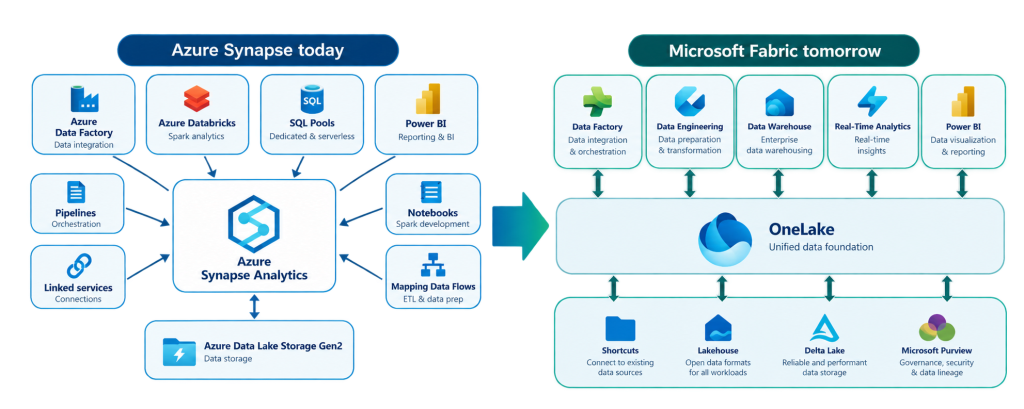
With Synapse and the wider Azure ecosystem, organizations typically use different services for data integration, engineering, storage, warehousing and analytics. Fabric brings these capabilities together within one SaaS platform.
OneLake plays an important role in that architecture. Instead of moving or copying data between different services, Fabric workloads can work from a shared data foundation. This can reduce unnecessary data movement and duplication.
The SaaS model also changes how much infrastructure the data team needs to manage. Microsoft takes responsibility for more of the underlying platform, allowing teams to spend more time on data and analytics rather than infrastructure management.
At the same time, Fabric capacity can be shared across engineering, warehousing, real-time analytics and reporting workloads, providing more flexibility and visibility into resource consumption.
The goal is not simply to replace Synapse with another technology. It is an opportunity to reconsider how the data platform should be structured going forward.
Start with the workloads, not the migration tool
One of the most important principles is that a Synapse-to-Fabric migration is not a one-to-one conversion.
Before migrating anything, make an inventory of what is actually running in Synapse. Typical components include:
- Linked services and datasets
- Azure, self-hosted and Managed Vnet integration runtimes
- Spark pools, notebooks and Spark jobs
- Dedicated SQL pools
- Serverless SQL pools
- Synapse pipelines
- Mapping Data Flows
- ADLS Gen2 storage
That inventory becomes the basis for defining scope, identifying dependencies and estimating migration effort.
How Synapse workloads map to Fabric
Different workloads require different Fabric targets.
| Azure Synapse workload | Typical Microsoft Fabric target | Migration approach |
|---|---|---|
| ADLS Gen2 Storage | Fabric Lakehouse (OneLake) | Conditional |
| Lake databases | Fabric Lakehouse or Warehouse | Assisted / redesign |
| Spark pools, notebooks and jobs | Environments, Fabric Notebooks and Spark Job Definitions | Assisted |
| Dedicated SQL Pool | Fabric Warehouse | Assisted + separate data copy |
| Serverless SQL Pool | Lakehouse, SQL analytics endpoint or Warehouse | Manual redesign |
| Mapping Data Flows | Dataflow Gen2, Notebook or Warehouse | Depends on complexity |
| Synapse Pipelines | Fabric Data Factory Pipelines | Assisted |
| Linked Services & Integration Runtimes | Connections and Gateways | Manual configuration |
Microsoft currently provides migration assistance for several major workloads, including Dedicated SQL Pools, Spark artifacts, pipelines and Data Flows. Serverless SQL does not have an equivalent native migration assistant and therefore requires a more pattern-driven redesign.
This distinction matters. A migration plan based purely on the number of Synapse artifacts can give a misleading picture of the actual effort. Two environments with the same number of artifacts may require very different amounts of redesign.
Define the Fabric target architecture first
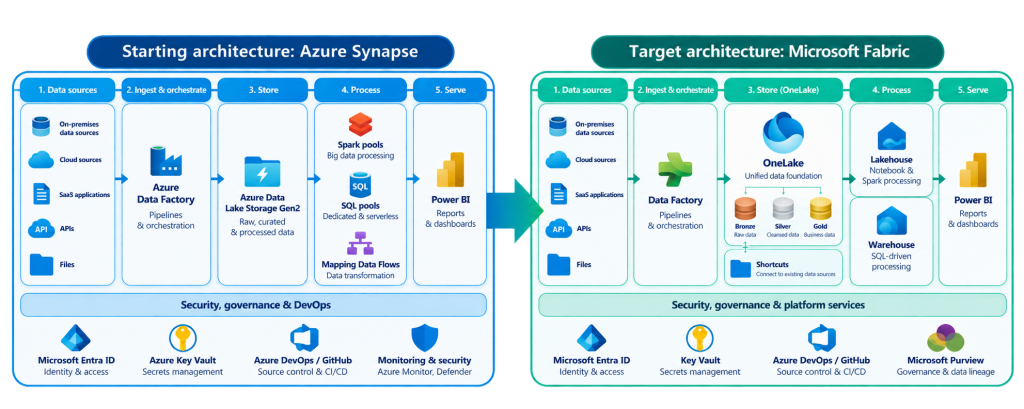
Before migrating workloads, you need to decide what the target architecture should look like.
A pure lift-and-shift may appear to be the quickest option, but the way workloads were structured in Synapse is not necessarily how they should be structured in Fabric.
For example, a Fabric target architecture can use:
- Bronze, Silver and Gold layers following a Medallion architecture
- Fabric Warehouses for SQL-driven workloads
- Lakehouses for notebook and Spark-driven processing
- OneLake as the shared data foundation
- Shortcuts where possible instead of unnecessarily copying data
The objective is therefore not to recreate Synapse inside Fabric. It is to preserve the required functionality while making deliberate use of Fabric’s architecture.
A five-step approach for a Synapse-to-Fabric migration
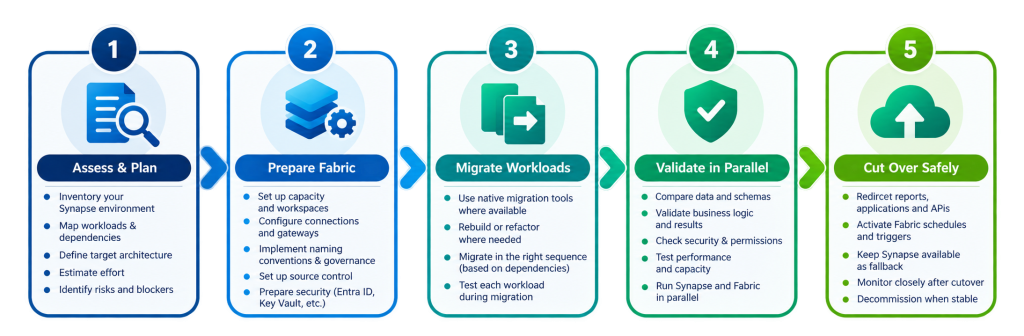
Once the current and target architectures are clear, the migration can be structured into five stages.
1. Assess and plan
Start with a complete inventory of the Synapse estate. Document pipelines, notebooks, SQL workloads, storage, security configurations and downstream dependencies. Identify blockers and classify each artifact according to its target and migration approach.
This assessment is also where you determine which workloads can use Microsoft’s migration tooling and where manual intervention or redesign will be required.
2. Prepare Fabric
The destination needs to be ready before workloads are migrated. This includes setting up:
- Fabric capacity
- Workspace structure
- Naming conventions
- Source control
- Connections
- Gateways
- Key Vault integration
- Initial security configuration
Dependencies matter here. For example, a connection to an on-premises source cannot work until the appropriate gateway exists.
3. Migrate workload by workload
Avoid trying to migrate the entire platform at once. Work through the different workloads in a controlled sequence, using Microsoft’s migration tooling where it fits and manual or assisted migration where it does not.
4. Validate Synapse and Fabric in parallel
A migrated artifact is not automatically a validated artifact. Run both environments alongside each other and compare schemas, data, query results, business logic, security and performance.
5. Cut over safely
Only redirect reports, applications and other consumers once the Fabric environment has been validated and approved.
Synapse can remain available during the transition as a rollback path.
Migration order matters
Even when individual workloads can be migrated, doing them in the wrong order can create unnecessary problems. The dependencies between components should determine the sequence.
A typical order is:
1. Prepare the target workspace
Set up capacity, workspaces, naming conventions, Git and Key Vault.
2. Deploy the required gateways
On-premises or VNet sources need their gateway infrastructure before connections can be established.
3. Create and map connections
Connections should exist before dependent artifacts are migrated.
4. Migrate Spark artifacts
Prepare Fabric Environments and migrate notebooks and Spark Job Definitions before pipelines that reference them.
5. Migrate or redesign SQL workloads and Data Flows
These target workloads should exist before dependent pipelines are moved.
6. Migrate pipelines
Once their dependencies are available, pipelines can be migrated, rebound and tested.
7. Rebuild security
Finalize Entra identities, workspace roles, item permissions and OneLake security.
8. Copy the remaining production data
The final data load takes place once structures, processing and security are ready.
This dependency-driven approach avoids situations where migrated artifacts arrive in Fabric but cannot function because the components they rely on are missing.
What does migration look like for the main Synapse workloads?
Linked Services and Integration Runtimes
Synapse Linked Services become Fabric Connections, but there is no universal native migration tool for them. Equivalent connections need to be recreated and validated in Fabric, although parts of the process can be automated through the Fabric REST API.
Self-hosted Integration Runtimes are not migrated as artifacts. They become an infrastructure consideration, typically using an On-premises Data Gateway. Managed VNet Integration Runtimes similarly require connectivity to be rebuilt using a VNet Data Gateway.
The existing integration runtime in Synapse should remain available until cutover.
Storage and OneLake
For ADLS Gen2, moving every file into OneLake is not automatically the right answer.
Organizations can choose to retain existing storage, expose data through OneLake shortcuts, physically copy it or convert data where appropriate.
The decision should consider storage accounts, containers, paths, formats, table types, volumes, security requirements and network restrictions.
Spark notebooks and jobs
Spark workloads are generally good candidates for assisted migration.
Fabric provides equivalents through Fabric Notebooks, Spark Job Definitions and Environments, and Microsoft provides a Synapse-to-Fabric migration assistant for these artifacts.
That does not mean every notebook will run unchanged. Code may still require refactoring. Examples include moving from mssparkutils to notebookutils and replacing hardcoded ADLS paths with OneLake paths. Some workloads, such as .NET for Spark or GPU-based workloads, require redesign.
Dedicated SQL Pools
A Dedicated SQL Pool typically maps to a Fabric Warehouse.
Microsoft’s Migration Assistant can migrate schema and supported security objects through a DACPAC or direct source connection. The data itself is copied separately.
This is another example of why “migration” should not be interpreted as a single operation. Schema, code, security and data may each follow their own path.
Some Synapse concepts also disappear because Fabric handles physical optimization differently. Indexes, distribution keys, partitions and materialized views, for example, should not simply be recreated without reconsidering whether they are relevant in Fabric.
Serverless SQL Pools
Serverless SQL is one of the areas where migration requires more redesign.
There is currently no native migration assistant that converts the workload end to end. Instead, each SQL object needs to be classified according to what it does.
Views over Delta can often be recreated relatively easily. OPENROWSET queries require changes to paths, syntax or authentication. External tables and PolyBase patterns typically require more redesign, while CETAS logic may move to a notebook, pipeline or Warehouse CTAS depending on the use case.
Synapse Pipelines
Synapse pipelines can be moved towards Fabric Data Factory pipelines using Microsoft’s migration experience.
Before migration, dependencies need to be assessed carefully: connections, gateways, notebooks, Spark jobs, child pipelines, global parameters and triggers can all influence whether a pipeline works correctly after migration.
Connections and Spark artifacts should already exist in Fabric. Triggers are recreated manually and remain disabled until the pipeline has been validated.
Mapping Data Flows
There is no single ideal target for every Mapping Data Flow.
Depending on complexity and purpose, a Data Flow could become:
- A native Dataflow Gen2
- A Spark notebook
- SQL logic in a Fabric Warehouse
- A Dataflow Gen2 using migrated MDF transformations
Simple transformations can often move towards Dataflow Gen2 or SQL-based ELT. More complex transformations may be better suited to Spark notebooks.
The migration is therefore also an opportunity to decide whether the original implementation pattern is still the right one.
Don’t copy security blindly
Security deserves its own workstream.
Synapse RBAC, SQL principals, ADLS ACLs and other security concepts do not map one-to-one to Fabric.
The target environment may combine:
- Microsoft Entra ID
- Fabric workspace roles
- Item-level permissions
- OneLake security
Rather than recreating every existing permission literally, the objective should be to preserve the intended access without unintentionally widening privileges.
A useful output of this exercise is a source-to-target access matrix showing each principal, its existing access, the Fabric equivalent, identified risks and the responsible owner.
Where automation helps, and where people still need to decide
Migration tooling can remove a significant amount of repetitive work, but it does not remove the need for architecture and engineering decisions.
Microsoft’s migration tools can assess and migrate supported artifacts. AI and agent-based assistance can help analyze dependencies, propose mappings, translate code, troubleshoot issues and prepare documentation.
Automated validation can then compare schemas, row counts, checksums, query results and performance.
But responsibility remains human.
Architects still define the target architecture and migration sequence. Data engineers review and refactor migrated artifacts. Platform and security engineers configure the environment and permissions. Business or workload owners ultimately confirm that the migrated solution produces the expected results.
A useful principle is:
AI proposes. Tools automate. Tests verify. People approve.
Filling the gaps between Microsoft’s migration tools
Microsoft already provides useful migration capabilities, but these tools largely operate within individual workloads.
A real Synapse environment is interconnected.
A pipeline may depend on a notebook, which depends on a connection, which depends on a gateway and reads data from ADLS. Looking at those components independently does not provide the complete migration picture.
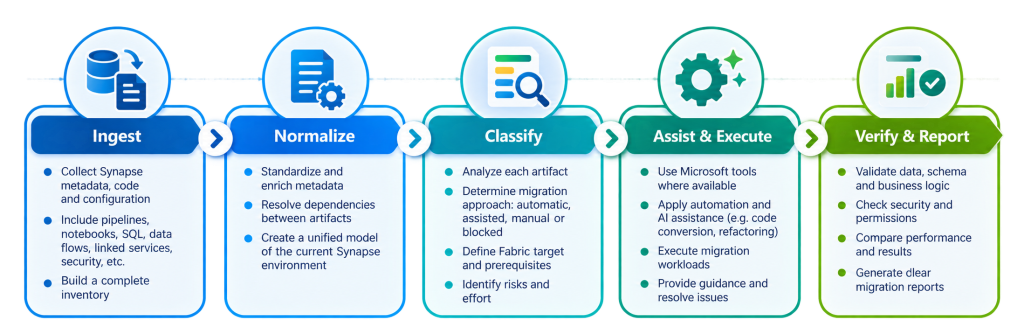
This is where we, at Lytix, use our Synapse-to-Fabric Migration Accelerator as an additional layer around the native Microsoft tooling.
The approach brings assessment results, Synapse metadata, code and configuration into a common inventory and dependency model. Each artifact can then be classified as automatic, assisted, manual or blocked, together with its Fabric target, prerequisites and responsible owner.
Where Microsoft’s tools provide migration support, we use them. Where native coverage stops, scripts or agent assistance can help with specific tasks such as T-SQL or PySpark rewrites, OPENROWSET conversion, Data Flow translation and proposed security mappings.
Importantly, generated output is not accepted automatically. It still needs to parse, compile, run or pass deterministic comparisons before it becomes part of the validated target environment.
Validation is part of the migration, not an afterthought
Technically moving an artifact into Fabric does not mean the migration is complete. Before cutover, validation should cover five areas:
Artifacts and structure: Are all expected pipelines, notebooks, dataflows and other components present, compilable and correctly connected?
Data: Do row counts, checksums and aggregated values match?
Business logic: Do queries, transformations, calculations and reporting outputs produce the expected results?
Security and operations: Do permissions, schedules, monitoring and failure handling work as intended?
Performance and capacity: Does the Fabric environment meet expectations for execution time, concurrency and resource consumption?
Where possible, Synapse and Fabric should be tested using the same input snapshot. Each migrated object receives a PASS or FAIL result, while expected differences are documented and approved.
Only after both technical and business validation should the migration proceed to cutover.
Make the final cutover reversible
The safest cutover is not a big-bang switch. Run Synapse and Fabric in parallel for an agreed period and compare the results under real operating conditions. Once the evidence has been reviewed and approved, reports, applications and APIs can be repointed towards Fabric.
Fabric schedules and triggers can then be activated while their Synapse equivalents are disabled.
Synapse does not need to disappear immediately. Keeping it readable during a grace period provides a practical rollback option while Fabric is being monitored for failures, access issues, performance and capacity.
Only when Fabric has proven itself in production should final decommissioning be considered.
Conclusion: treat the move to Fabric as a modernization, not a conversion
Moving from Azure Synapse Analytics to Microsoft Fabric is not about pressing a migration button and recreating the same environment somewhere else.
Some workloads can be migrated with Microsoft’s native tooling. Others require configuration, refactoring or architectural redesign. And because these workloads depend on each other, the sequence in which they are migrated matters just as much as the migration method itself.
A good migration therefore starts with three questions: What do we have today? Where should each workload live in Fabric? And what needs to be proven before we switch over?
With a clear inventory, target architecture, dependency-driven migration sequence and structured validation process, organizations can move towards Fabric without turning the transition into a high-risk big-bang project.
Planning your Synapse-to-Fabric migration?
Moving from Azure Synapse to Microsoft Fabric starts with understanding your current environment and choosing the right migration approach.
Want to explore the migration process in more detail? Watch our on-demand webinar, From Azure Synapse to Microsoft Fabric: A Practical Migration Path, where we walk through the key considerations and practical steps.
Already planning your migration? Our Microsoft data team can help you assess your Synapse environment, identify the right Fabric architecture and define a realistic migration roadmap.

Pierre Kizas
Consultant @ Lytix

