


21/10/2026
Just Ask in SAP Analytics Cloud: a hands-on journey from question to automated insight
Consider a familiar scenario in most organizations. Julia, a Regional Controller, receives a request from her VP: “Who are our top 5 stores by gross margin?” Her first question is “Which dashboard should I open to answer my question?”. The organization may already have hundreds of dashboards and reports, but perhaps none of them answers this exact question. Under a traditional reporting process, this question would be routed to the BI team, queued alongside other requests, and answered days (sometimes weeks) later, often in a format that requires further clarification.
This is the gap that Just Ask, the natural-language search capability in SAP Analytics Cloud (SAC), is designed to close. Rather than navigating through dashboards or submitting a request and waiting for a report, business users can ask their question directly, in plain language, and receive an accurate, chart-ready answer within seconds.
But there is an important distinction between making a question easy to ask and making every question easy to answer.
Just Ask relies on the underlying analytical model, its business terminology, configured rules, user authorizations, and the quality of the data. The user experience is therefore not only about the conversational interface itself, but also about how well the analytical content has been prepared.
To illustrate how this works in practice, we recorded a demonstration on a live SAP sample model, walking through the complete process: from enabling the feature, to configuring the underlying business logic, to automating the delivery of results by email. This article summarizes each step shown in the video.
Watch the demonstration
Step 1 – Enabling Just Ask
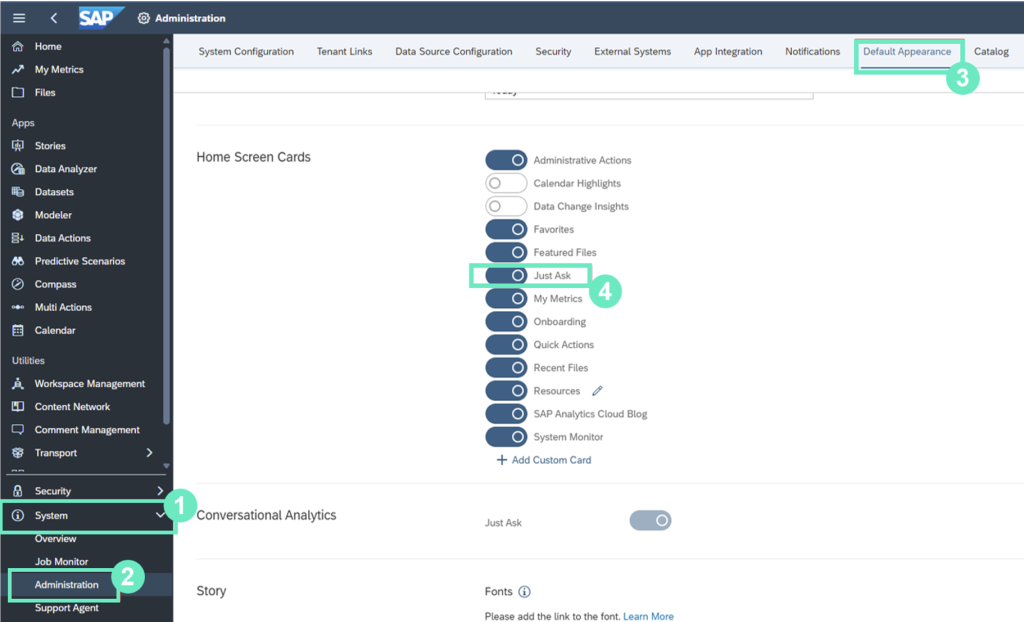
Making Just Ask available to end users requires a one-time administrative configuration. In System → Administration → Default Appearance, under Home Screen Tiles, administrators can set Just Ask as the default landing experience. Once enabled, users with the appropriate permissions can access the natural-language interface directly, with no additional setup required on their end.
Step 2 – Aligning the model with business language
A natural-language interface is only as effective as its understanding of business terminology.
By default, Just Ask interprets a model’s technical field names, but end users rarely think in those terms. Two configuration steps address this gap:
- Synonyms: Just Ask supports synonyms for measures and dimensions, allowing users with the right permissions to make the model easier to query using the language users actually use.
In our example, we configured Sales Manager to also be recognized under the terms “Salesman” and “Seller,” and Store under “Shop” and “Supermarket.” This ensures that regardless of the specific wording a user chooses, the system correctly maps it to the intended field. - Rules: Just Ask also supports rules. We created a rule, “Store_SalesManager“, specifying that whenever Store is selected as a dimension, Sales Manager is automatically included in the result. Testing this rule directly within the interface, by entering the query “show top 5 stores by gross margin“, returned a result titled “Top 5 Gross Margin by Shop and Sales Manager,” confirming that both the synonym and the rule had been applied correctly, without requiring the end user to be aware of the underlying relationship between the two dimensions.
This step is often skipped, but it is what determines whether a natural-language tool merely functions, or genuinely reflects how the business communicates.
Step 3 – Asking the question
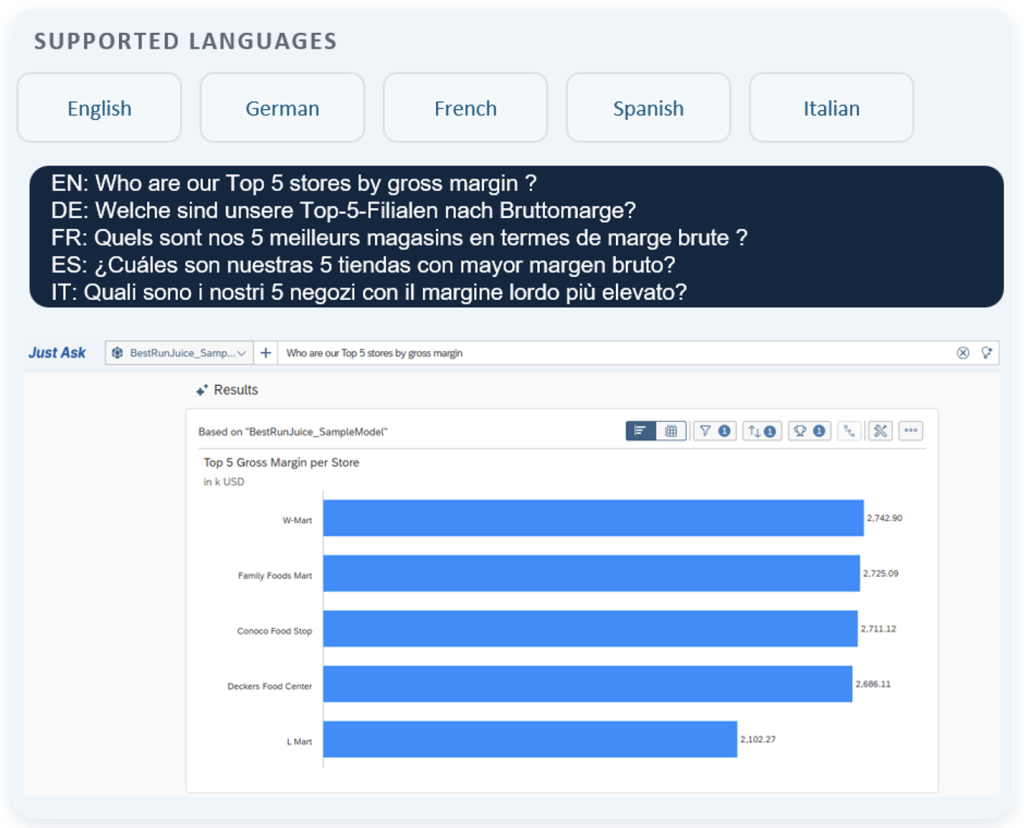
With the model appropriately configured, the user enters his question exactly as he would phrase it to a colleague: “Who are our Top 5 stores by gross margin?”
No query syntax or technical field references are required. In addition, Just Ask natively supports five languages (English, French, German, Italian, and Spanish), allowing users across different regions to ask the same question in their own language and receive consistent, accurate results.
Step 4 – Interpreting the result
Just Ask does not simply return a data set; it determines the most appropriate way to present it.
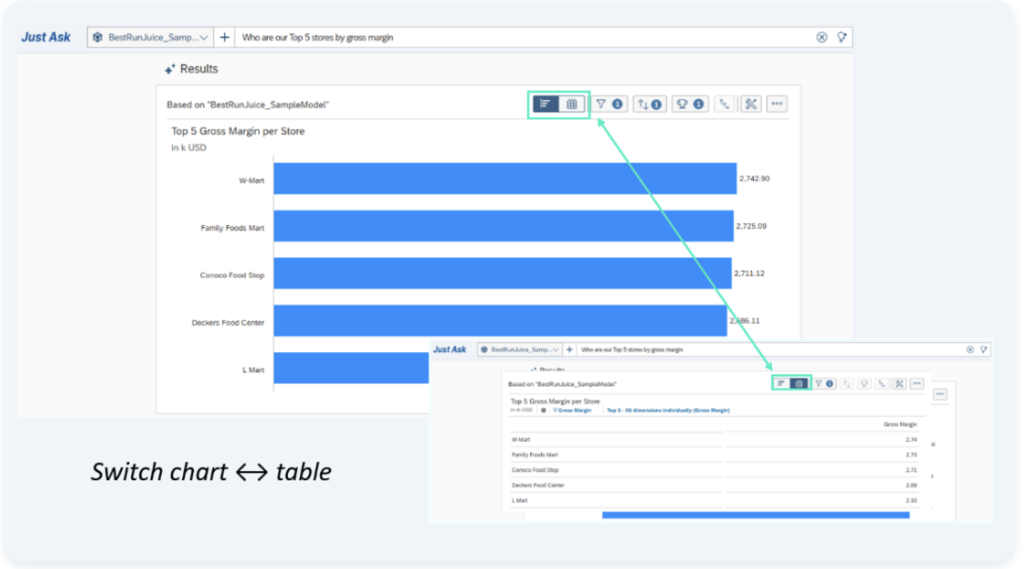
For a top-N comparison, the system automatically generates a bar chart; a trend-based question would instead produce a line chart. Users can also toggle between the visual chart and the underlying data table with a single click, depending on their immediate need.
This is what’s sometimes called grounded AI: the result is generated directly from the structured, trusted model, rather than inferred or invented by the language model itself. Just Ask decides how to query the data, never what the data says.
Step 5 – Refining the analysis in Data Analyzer
Initial results generated by Just Ask often benefit from further detail than a single natural-language query can capture. Rather than rephrasing the question repeatedly, users can open the result directly in Data Analyzer, where any dimension available in the model can be added to the analysis for greater granularity.
In our demonstration, we added a Location dimension to break down gross margin by city. The table initially displayed internal codes (CT1, CT4, CT5, and so on), a common detail, easily corrected by switching the dimension’s Display Options from “ID and Description” to “Description,” which revealed the actual city names. A minor adjustment, but one that materially affects whether a report is genuinely usable by its intended audience.
Step 6 – Preserving and sharing the result
Saving a result is entirely optional in a conversational workflow, as questions can always be re-queried on the fly. Saving an Insight acts as a practical shortcut for future review or collaboration.
In our demonstration, once the analysis was finalized, we saved it as an Insight, a reusable snapshot that retains the exact query, filters, and level of detail applied. From this saved Insight, sharing the result with a colleague requires only a few clicks: selecting the recipient and defining their access level.
Step 7 – Turning a question into automated reporting
Scheduled delivery is also optional, and is best kept for specific needs, such as a recurring management update or recipients who do not use SAP Analytics Cloud. For most day-to-day questions, the strength of conversational analytics remains the same: users get an up-to-date answer by simply asking, without waiting for a report to be produced.
When a fixed delivery is useful, Just Ask supports it through the Schedule Publication function on a saved Insight. Users can define a recurrence schedule, an output file format, an email subject and message, and recipients (both within and outside SAP Analytics Cloud), so the same result is delivered automatically.
In our demonstration, we scheduled the Insight to run daily over two working days, in Excel format, with recipients including both an internal SAP Analytics Cloud user and an external email address. Shortly afterward, the scheduled email was delivered as configured, with the Excel file attached and ready to use, requiring no login to SAP Analytics Cloud on the recipient’s part.
Points of attention – what we learned along the way
The demonstration above shows Just Ask at its best : a model already configured, a rule already tested, a question it was built to answer. Getting there takes a bit more than switching the feature on.
A few lessons from our experience are worth considering before rolling Just Ask out more broadly.
- Model scope matters more than expected: Just Ask works against one specific model at a time, so agreeing upfront on which model a team should use for a given set of questions (rather than exposing every model) gives users a clear, trusted place to start.
- Business vocabulary is part of the setup, not an afterthought: the same concept can be phrased several different ways, and across languages that variation only grows, which is exactly why the synonym work described in Step 2 deserves real attention.
- The first answer isn’t always the final one: refining a question, as we did in Step 5, is a normal part of the workflow, not a sign that something went wrong. Users may just need to clarify what they mean, add context, or adjust the level of detail they are looking for.
- Just Ask has a scope: it’s built for well-defined business questions, not as a replacement for deeper, more exploratory analysis, where Data Analyzer remains the right tool.
The broader lesson: the effort doesn’t disappear, it moves upfront, into preparing the model, the vocabulary, and the users, once. Get that right, and Just Ask makes a broad range of everyday questions genuinely easy to answer.
Authorization & Security
Just Ask involves two distinct layers of authorization, both worth understanding before rolling it out.
The first governs access to the feature itself: Users need the Execute permission for the Just Ask privilege to access Just Ask, run queries, and view results. Higher permissions provide additional capabilities, such as interacting with models not currently available to end users or, with Manage, maintaining models, synonyms, and rules.
The second, more important layer governs access to the underlying data: Just Ask never overrides the data security already configured in a model. Any row-level restrictions or dimension-based access controls that apply elsewhere in SAP Analytics Cloud apply identically here. A user will never see, through Just Ask, data they would not otherwise be authorized to access. In short, natural-language search adds a new way to ask questions, not a new way to bypass existing governance.
Conclusion
Across the seven steps above, a single business question was answered, refined and, where useful, saved, shared and even scheduled, without a single request submitted to the BI team for this specific question. For most questions, the journey can simply stop at the answer: users ask, refine and get an up-to-date result in the moment. This reflects the core value proposition of Just Ask: shifting the interaction model from submitting a report request to having a conversation with your data.
The advantages are significant: immediate, self-service answers for ad-hoc questions; reduced reporting backlogs; and results that can be refined, saved, and scheduled without leaving the platform.
But this doesn’t happen on its own and it doesn’t remove the BI team from the picture either. What actually makes it work is what sits underneath: reliable data, solid semantic modelling, shared business vocabulary, appropriate rules, and governance. These are areas where BI teams remain essential, both in preparing the foundations and in helping users get the most out of the tool.
Get that right, and conversational analytics stops being a feature… it becomes how people work.

Camelia Rabyi
Consultant @ Cubis

